GitHub Flow
GitHub Flow
GitHub Flow is a lightweight, branch-based workflow that supports teams and projects where deployments are made regularly. It is simpler than GitFlow and is ideal for Continuous Delivery.
The Core Workflow
1. Create a Branch
Whenever you're going to work on a feature or a fix, you create a branch off of main. Give it a descriptive name like add-login-button or fix-header-style. This keeps the main branch stable and allows you to experiment without risk.
2. Add Commits
As you make changes, add commits to your branch. Each commit should represent a unit of work. This makes it easier for others to understand your progress and provides a clear history of your changes.
3. Open a Pull Request
Once your work is ready for review, open a Pull Request (PR). A PR is a way to start a conversation about your changes and invite others to review your code, run tests, and provide feedback.
4. Discuss and Review
Team members will review your code, leave comments, and suggest improvements. You can continue to add commits to your branch in response to the feedback.
5. Merge and Deploy
Once the PR is approved and passes all tests, it is merged into the main branch. Since the main branch is always deployable, the new changes can be pushed to production immediately.
Visual Flow
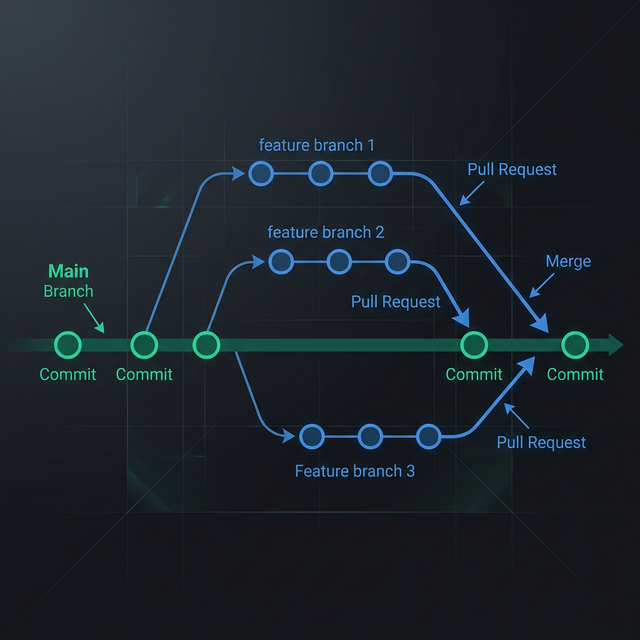
GitHub Flow is the foundation of modern collaborative development, emphasizing simplicity, communication, and frequent delivery.